

A great design portfolio might get a recruiter's attention, but your resume helps them understand the thinking behind your work.
When recruiters review a UX/UI Designer resume, they're looking for more than someone who can create visually appealing interfaces. They want to know whether you can understand user needs, solve usability problems, and turn ideas into digital experiences that work.
Simply writing “designed website and mobile app interfaces” doesn't show the full value you bring to a product team.
You don't need to have worked for a big tech company or launched a product with millions of users to stand out. What matters is how you demonstrate your design process, problem-solving skills, and the impact of your work. A strong UX/UI Designer resume connects your design skills to the value you can bring to users and businesses.
UX/UI design is about more than creating attractive screens or choosing the right colors. Employers need designers who can understand user needs, balance usability with business goals, and collaborate with cross-functional teams to build effective digital products.
That's why hiring managers look for evidence of:
User-centered thinking: Can you understand user needs, behaviors, and pain points?
UX research and problem-solving: Can you identify usability issues and use research or feedback to inform design decisions?
UI and interaction design: Can you create clear, consistent, and accessible interfaces?
Design systems and consistency: Can you maintain reusable components and consistent design patterns?
Collaboration: Can you communicate design decisions and work effectively with product managers, developers, and other stakeholders?
Measurable impact: Did your work improve task completion, usability, conversion, engagement, or another meaningful product outcome?
Whether you're applying for a Junior UX Designer, UI Designer, UX/UI Designer, Product Designer, or Senior UX Designer position, your resume should make these capabilities easy to identify.
Think of your resume as a user interface itself. It should be easy to navigate, communicate the most important information quickly, and help recruiters find what they need without unnecessary friction.
Keep your contact details simple and professional. Include:
Full name
Phone number
Professional email address
LinkedIn profile
Location
Portfolio website or selected case studies
Your portfolio is especially important for UX/UI design roles. Your resume tells recruiters what you can do, while your portfolio provides evidence of how you approach design problems and make decisions.
Make sure your portfolio links work and that recruiters can access your projects without unnecessary login requirements. If a project contains confidential company information, use approved, anonymized, or publicly shareable examples instead.
Write two to four sentences explaining your experience, design specialization, key skills, and the value you bring to a product team.
Example:
UX/UI Designer with 3+ years of experience designing intuitive web and mobile experiences for consumer-facing digital products. Skilled in user research, wireframing, prototyping, usability testing, and Figma, with experience collaborating with product managers and developers to translate user needs into accessible, user-centered interfaces.
If you're just starting your career, focus on relevant coursework, internships, personal projects, and transferable skills rather than trying to sound like a senior designer.
This is one of the most important sections for experienced candidates. Instead of listing everyday responsibilities, explain the design problems you worked on, the decisions you made, and the outcomes you helped achieve.
For example, instead of writing:
Responsible for designing mobile app screens.
Worked with developers to implement UI designs.
Conducted user research and usability testing.
Try showing the context, your contribution, and the result:
Redesigned the mobile checkout flow based on usability testing findings, helping reduce unnecessary steps and contributing to a 15% increase in checkout completion.
Built a reusable Figma component library that improved design consistency and reduced repetitive design work across product screens.
Collaborated with product managers and developers to refine user flows and resolve usability issues before implementation.
Use actual results from your work wherever possible. If you cannot measure the business impact, describe the problem you addressed, the deliverable you created, and how it helped the team.
Include a combination of design methods, technical tools, and collaboration skills that match the job description.
UX skills: User research, user interviews, usability testing, information architecture, user flows, journey mapping, wireframing, accessibility, and interaction design.
UI skills: Visual hierarchy, typography, color theory, responsive design, layout design, interaction states, and design systems.
Tools: Figma, FigJam, Adobe XD, Sketch, Adobe Illustrator, Adobe Photoshop, and prototyping tools, depending on your actual experience.
Collaboration skills: Design critique, stakeholder communication, cross-functional collaboration, design handoff, problem-solving, and presenting design rationale.
Prioritize skills you have actually used and can confidently explain during an interview. You don't need to list every design tool available.
Include your degree, university, major, and graduation year.
Relevant backgrounds may include interaction design, human-computer interaction (HCI), graphic design, digital media, psychology, computer science, or related disciplines.
However, UX/UI designers come from many different backgrounds. A design-related degree can be helpful, but it isn't the only path into the profession. Relevant projects, practical skills, and a strong portfolio can also demonstrate your capabilities.
Certifications and courses can help demonstrate your commitment to learning, particularly if you're transitioning into UX/UI design or building your foundational skills.
Depending on your experience and career goals, relevant learning areas include:
UX research and usability testing
Human-computer interaction
Interaction design
UI design and visual fundamentals
Accessibility and inclusive design
Design systems
Prototyping and user testing
Product design fundamentals
Include certifications you've actually earned and courses that are relevant to your target position. If a course is still in progress, label it accordingly.
Remember that completing a course doesn't automatically demonstrate professional competence. Whenever possible, connect what you've learned to a practical project or case study.
If you have limited professional experience, projects can help demonstrate your design thinking and practical abilities.
Consider including:
University design projects
Mobile app redesigns
Website redesigns
Personal UX research projects
E-commerce checkout improvements
Dashboard and data visualization interfaces
Design system projects
Volunteer or nonprofit design work
Internship projects
Conceptual products that solve a clearly defined user problem
For each project, explain:
The problem: What user need or pain point were you trying to solve?
Your role: What parts of the project did you own?
The process: How did you research, explore, test, and refine your ideas?
The tools: What tools or methods did you use?
The outcome: What did you learn, improve, or deliver?
A portfolio shouldn't just display polished mockups. It should help recruiters understand why you made certain design decisions and how you approached the problem.
For personal or conceptual projects, be transparent about the scope. Don't present hypothetical improvements as verified business results.
One resume for every application can make your experience appear too general.
UX/UI job titles often overlap, but the responsibilities can differ significantly. Read the job description carefully and identify the design methods, tools, product experience, and collaboration skills the employer values most.
For example:
UX Designer
User research and interviews
Information architecture
User journey mapping
Wireframing and usability testing
Identifying user pain points
Research synthesis and design validation
UI Designer
Visual design and layout
Typography and color systems
Responsive interface design
Component libraries and design systems
Interaction states and visual consistency
Developer-ready design specifications
UX/UI Designer
User research and interface design
User flows and interactive prototypes
Usability testing
Responsive design
Figma and design handoff
Collaboration with product and engineering teams
Product Designer
End-to-end product design
User problems and product requirements
Design strategy and prioritization
Prototyping and validation
Product metrics and iteration
Cross-functional collaboration
Senior UX/UI Designer
Complex user problems and design strategy
Research planning and synthesis
Design systems and scalable solutions
Stakeholder alignment
Mentoring and design critique
Product impact and decision-making
If the job description emphasizes usability testing and research, make your research experience easy to find. If it focuses on visual design and design systems, highlight your interface work, component libraries, and design consistency.
You're not changing your background. You're showing how your existing experience matches the employer's needs.
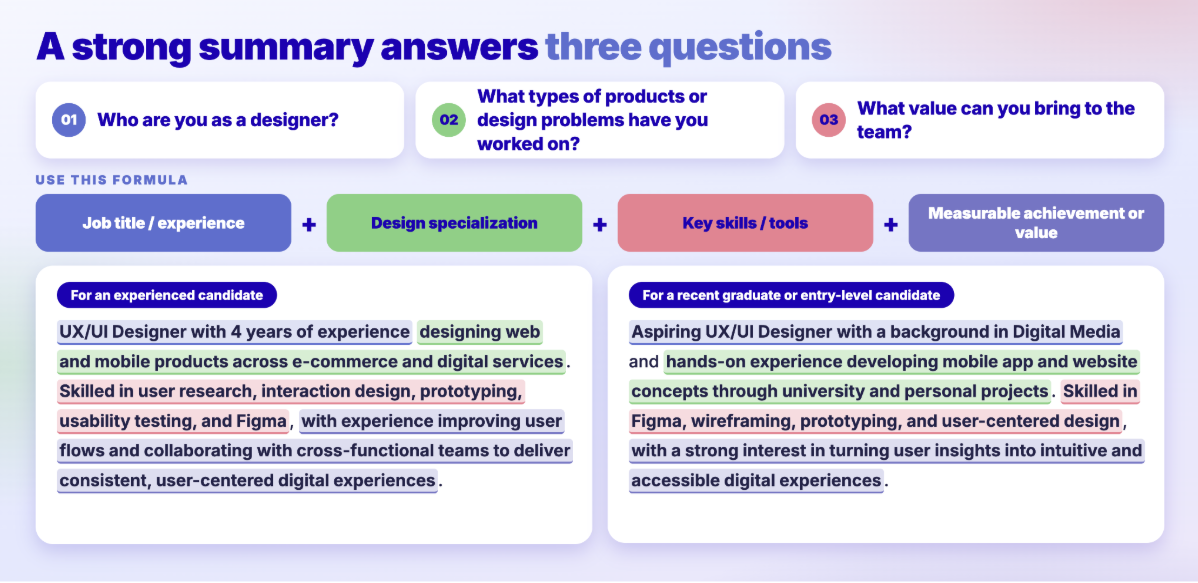
Keep your summary concise and specific. Avoid vague statements such as “passionate creative designer” unless you support them with relevant skills, experience, or achievements.
If you include a metric, make sure you can explain how it was measured and what your contribution was.
This is where many UX/UI Designer resumes fall short. Candidates describe the screens they created without explaining the problems those designs were meant to solve.
Recruiters want to understand not only what you designed, but also how you thought through the problem and contributed to a better outcome.
Compare these examples:
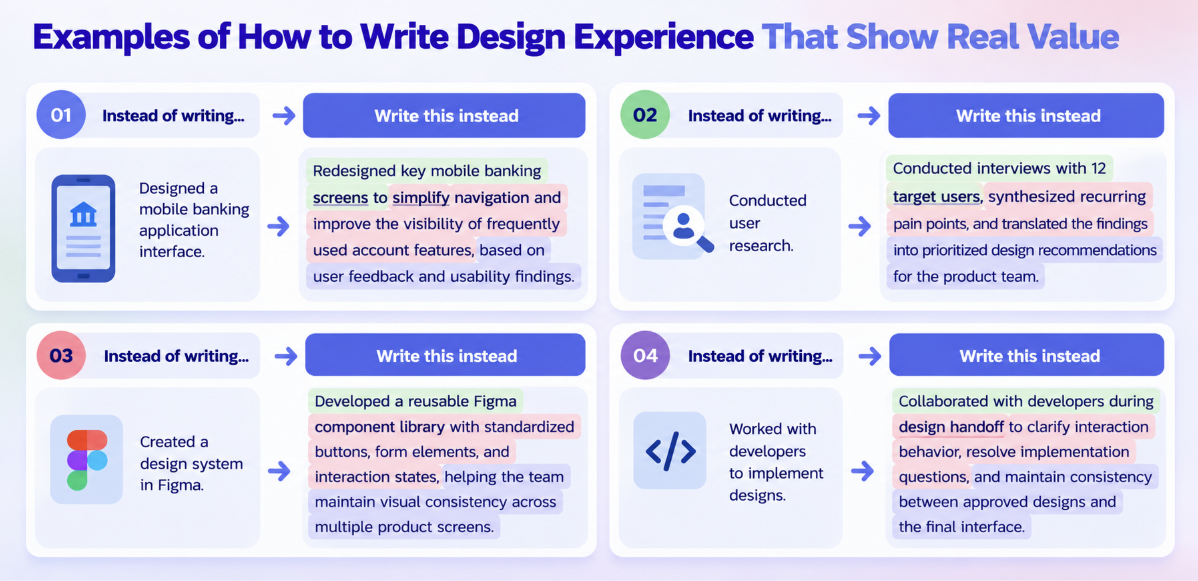
These examples show the scope of your work, the reasoning behind your decisions, and the value you contributed.
UX/UI design involves multiple stages. Your resume can demonstrate your experience by highlighting the process behind your work:
Research: Identified user needs through interviews, surveys, analytics, or usability testing.
Define: Organized findings into user problems, journey maps, requirements, or design priorities.
Ideate: Explored alternative solutions through sketches, user flows, and wireframes.
Prototype: Created interactive prototypes to communicate and validate design concepts.
Test: Gathered user feedback and identified usability issues.
Iterate: Refined the design based on findings, technical constraints, and stakeholder input.
Deliver: Prepared specifications and collaborated with developers to support implementation.
You don't need to include every stage in every bullet point. Focus on the methods that are relevant to the position you're applying for.
Metrics help recruiters understand the scale and potential impact of your design work.
Consider including results such as:
Improved task completion rate from 70% to 85% during usability testing.
Conducted research interviews with 15 users across three customer segments.
Reduced the average number of steps in a checkout flow from six to four.
Created 30 reusable components for a product design system.
Redesigned five core user journeys across web and mobile platforms.
Identified 12 recurring usability issues during a usability evaluation.
Contributed to a 10% increase in conversion after a product interface redesign.
These are illustrative examples, not benchmarks or guaranteed outcomes. Use them only if they accurately reflect your own work and the available evidence.
You don't need a percentage in every bullet point. The number of users researched, screens designed, components created, or usability issues identified can also demonstrate your scope and experience.
Never invent metrics or claim that a design caused a business improvement without evidence. If you don't have access to product analytics, explain what you tested, what changed, and what you learned.
Your resume should reflect your career stage. A junior candidate needs to demonstrate design fundamentals, curiosity, practical projects, and the ability to learn. An experienced designer needs to show ownership, sound design decisions, collaboration, and measurable product impact.
Here are two examples you can use as a starting point.
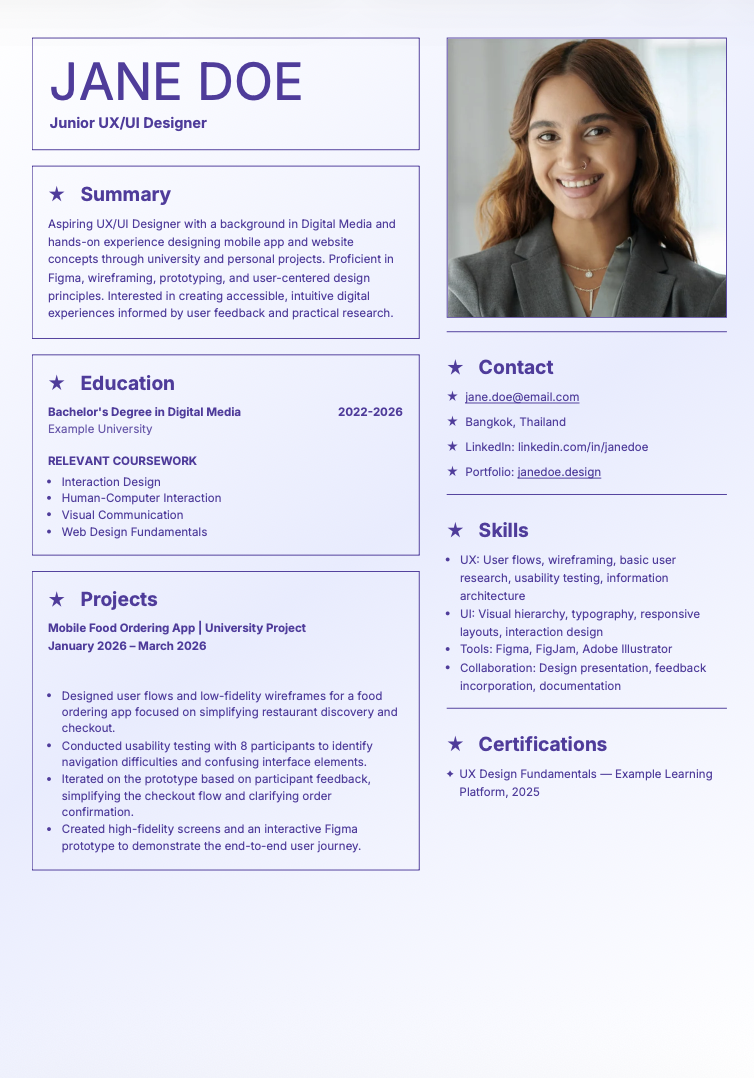
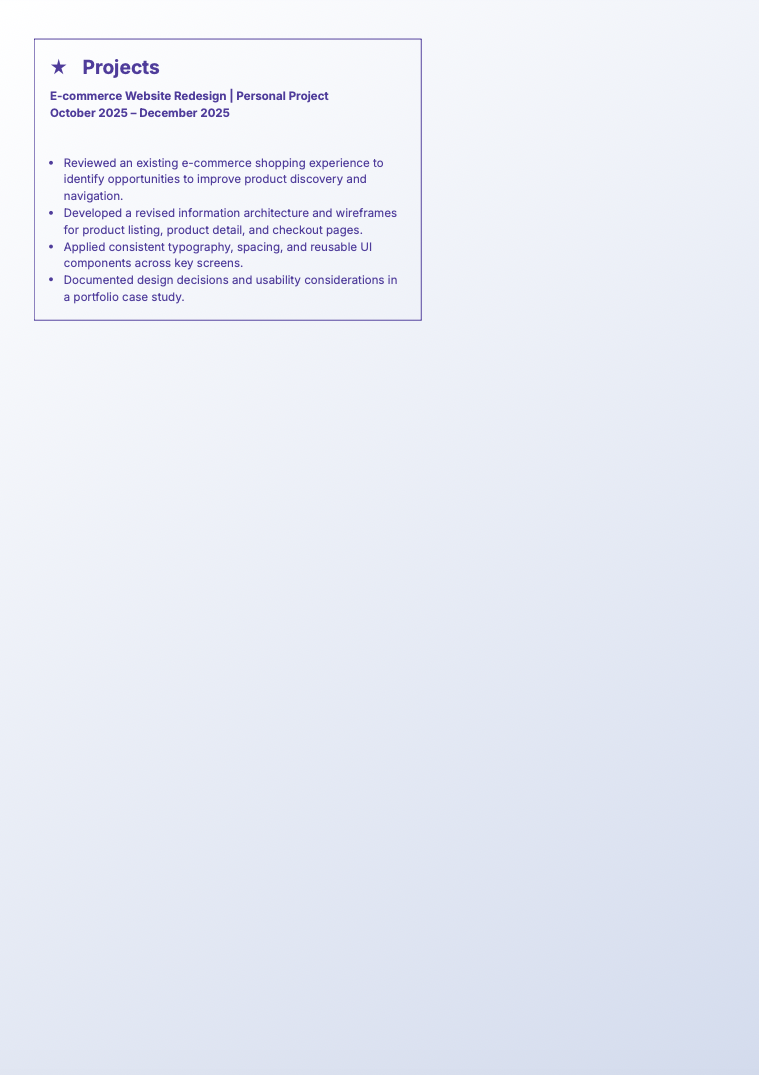
Why this resume works: It demonstrates practical design skills and a structured approach to solving user problems without overstating professional experience. University projects, personal projects, and usability testing provide evidence of the candidate's potential.
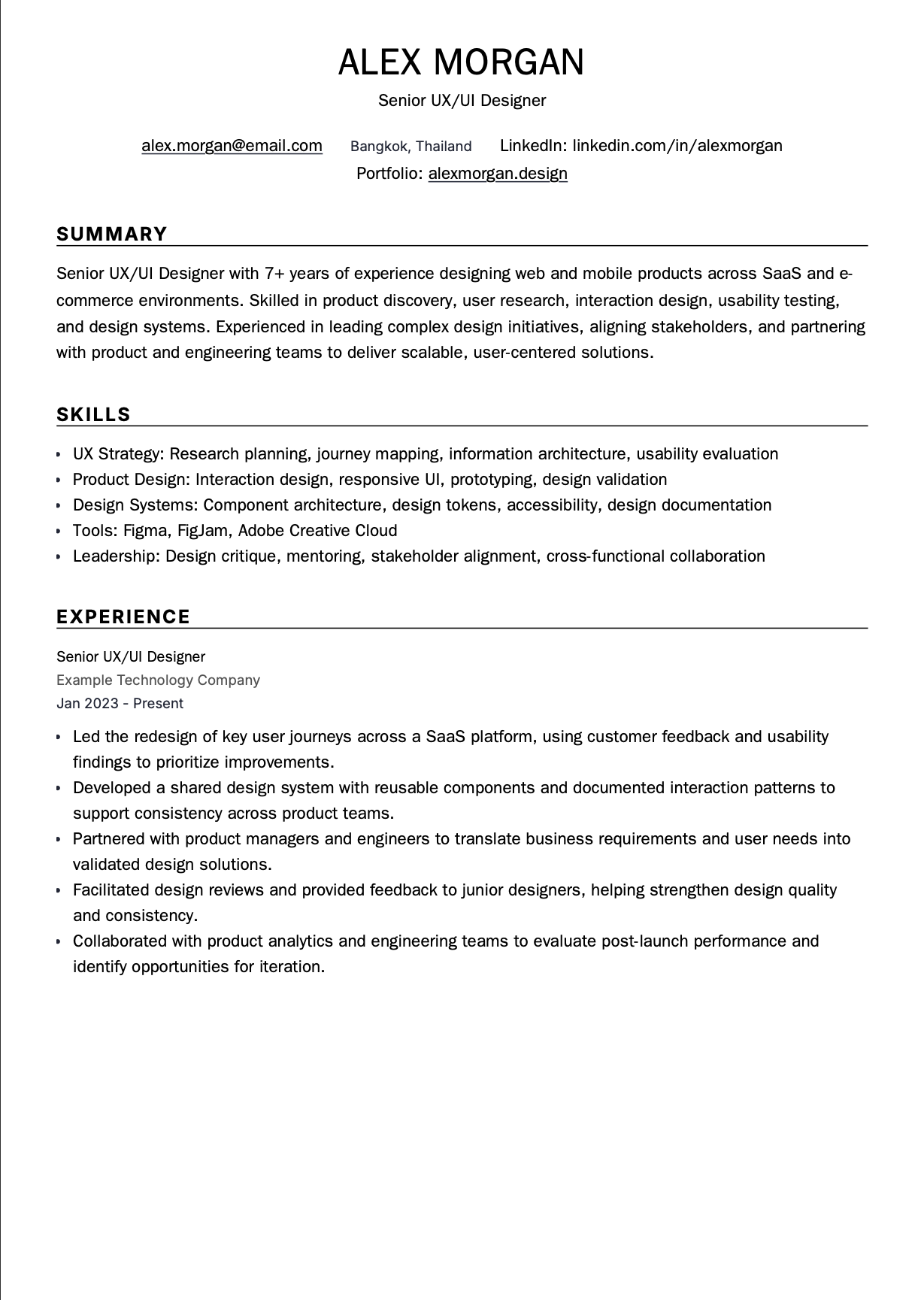
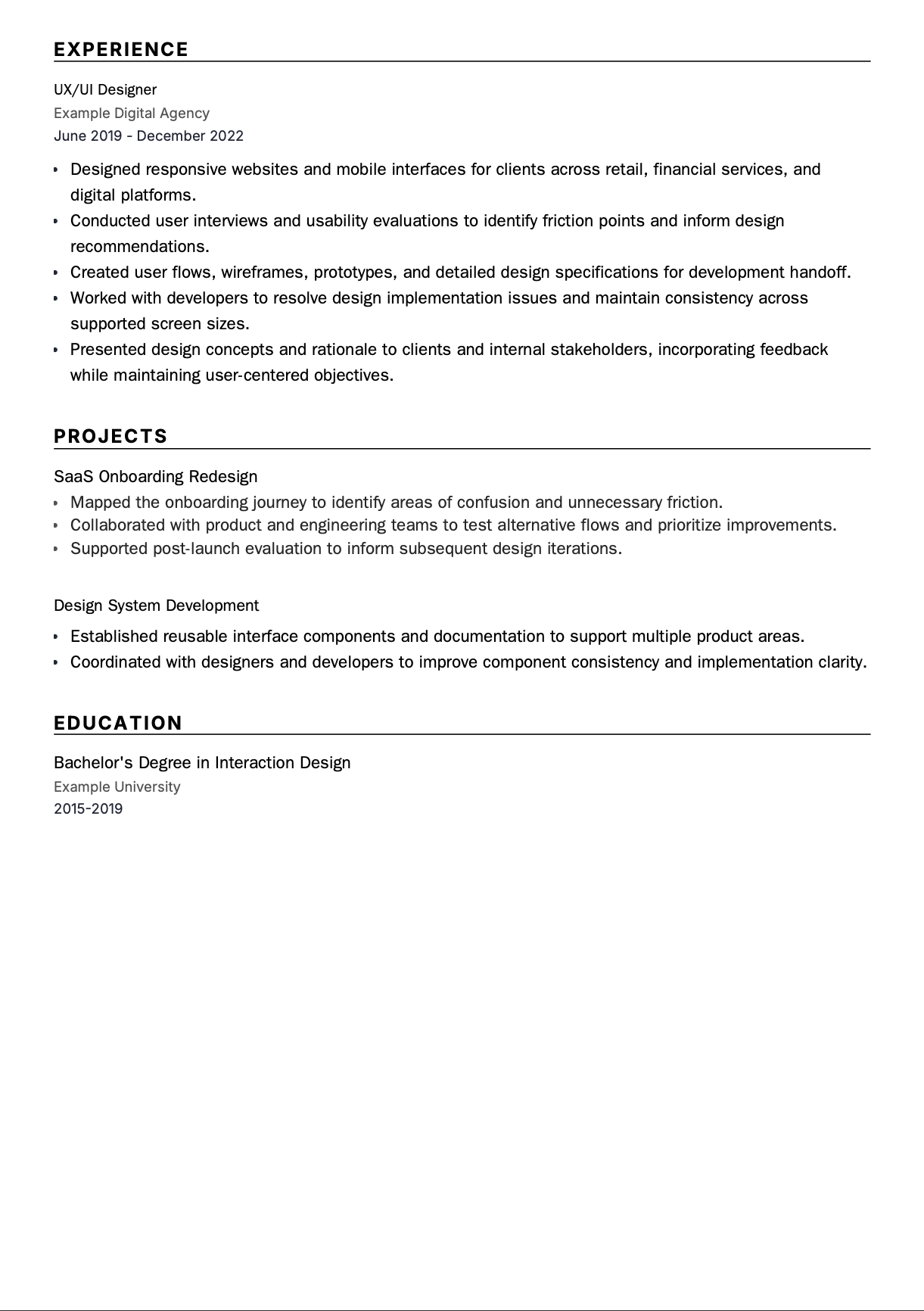
Why this resume works: It demonstrates more than interface production. It highlights strategic ownership, research-informed decisions, scalable design systems, stakeholder communication, and cross-functional leadership. These are important differentiators for senior design positions.
Want a resume like these in minutes? Use Jobcadu's Resume Builder to create a professional, ATS-friendly resume, organize your design experience, and highlight the skills relevant to your target role without needing advanced formatting skills.
Your skills section should match the type of design work you want to do. A research-focused UX position and a visually focused UI position may require different strengths.
User research and interviews
Usability testing
Information architecture
User journey mapping
User flows and wireframing
Research synthesis
Accessibility principles
Figma or similar prototyping tools
Visual hierarchy
Typography and color theory
Responsive interface design
Layout and grid systems
Component libraries
Interaction states
Design systems
Figma and relevant visual design tools
User-centered design
Wireframing and prototyping
User research and usability testing
Interaction and visual design
Responsive web and mobile design
Design systems and reusable components
Figma and FigJam
Design handoff and developer collaboration
End-to-end product design
Product discovery and problem framing
User research and validation
Interaction design and prototyping
Design prioritization
Product analytics and experimentation
Design systems
Cross-functional collaboration
Design strategy
Complex problem-solving
Research planning and synthesis
Design system governance
Accessibility and inclusive design
Stakeholder management
Design critique and mentoring
Product outcome evaluation
You don't need to list every skill in a category. Prioritize the skills requested by the employer and support them with relevant examples from your resume or portfolio.
“Designed a mobile app” doesn't tell a recruiter much.
“Redesigned the onboarding flow after usability testing identified three recurring points of confusion” gives them a clearer picture of your contribution.
Whenever possible, connect your design decisions to usability findings, user feedback, product outcomes, or implementation improvements.
Applicant tracking systems (ATS) help employers organize and search applications. Relevant keywords can also make it easier for recruiters to identify your qualifications.
If a job description mentions Figma, prototyping, usability testing, design systems, accessibility, and responsive design, include those terms when they accurately reflect your experience.
Use the terminology that matches the role. For example, a UX research-focused position may prioritize user interviews and research synthesis, while a UI-focused position may emphasize visual design and component libraries.
Avoid keyword stuffing. Your resume should demonstrate how you've applied the skills, not simply repeat a list of terms.
A visually impressive resume isn't necessarily easy for recruitment software to read.
To improve readability:
Use standard headings such as Professional Summary, Work Experience, Skills, and Education.
Choose a clean, readable font.
Use straightforward bullet points.
Keep essential information in selectable text rather than images.
Be cautious with complex columns, tables, and decorative elements.
Follow the employer's requested file format.
Check that your contact details and portfolio links are easy to find.
Your resume and portfolio serve different purposes. Keep the resume clear and easy to scan, then use your portfolio to demonstrate visual craft and detailed design thinking.
You don't need to rewrite your entire resume for every position.
Instead, tailor your summary, skills, selected achievements, and project examples to the role.
For a UX Designer position, emphasize research, user flows, and usability testing. For a UI Designer role, highlight visual systems, responsive layouts, and interface consistency. For a Product Designer position, demonstrate how you connect user needs with product requirements and collaborate across teams.
Your goal is to make the most relevant experience easy to find.
A UX/UI Designer resume is stronger when the portfolio supports the claims you make.
If your resume mentions usability testing, include a case study that explains what you tested and what you learned. If you highlight design systems, show the components, documentation, and decisions behind the system where appropriate.
Make sure your portfolio is easy to navigate, your role in each project is clear, and your case studies distinguish your own contributions from those of your team.
You don't need dozens of projects. A few relevant, well-explained case studies can be more useful than a large collection of screens without context.
Listing design responsibilities without explaining the problem you solved.
Focusing entirely on visual appearance while ignoring usability and user needs.
Sending the same resume to every employer without tailoring relevant skills.
Listing design tools you have never used or cannot confidently discuss.
Leaving out your portfolio link or including broken links.
Presenting personal or conceptual projects as real commercial work.
Claiming improvements in conversion or engagement without supporting evidence.
Using overly complex resume layouts that make information difficult to scan.
Overloading the resume with every project instead of prioritizing relevant work.
Ignoring accessibility, consistency, spelling, dates, and ATS readability.
A great UX/UI Designer resume isn't simply a list of screens you've created or tools you've used. It's a clear demonstration of how you understand users, solve design problems, communicate decisions, and contribute to better digital experiences.
Whether you're applying for your first design role or pursuing a senior product design position, focus on relevant skills, credible achievements, and the design thinking behind your work.
Don't let resume formatting distract you from showcasing your design skills.
With Jobcadu's Resume Builder, you can create a professional, ATS-friendly resume using polished templates and organize your experience around the skills and achievements recruiters want to see.
Build a resume that communicates your value clearly, then let your portfolio bring your design thinking to life.
Start building your UX/UI Designer resume with Jobcadu's Resume Builder now →
No sections detected in this article.


.jpg&w=3840&q=75)
