

AI can help you finish a task in minutes, but can you still tell whether the answer is actually good?
From drafting emails and summarizing reports to brainstorming campaign ideas and analyzing data, AI is becoming a practical assistant for everyday work. Used well, it can help people save time, explore new perspectives, and learn unfamiliar topics faster.
But there's a catch: the easier it becomes to generate an answer, the more important it becomes to know whether that answer is worth trusting.
For marketers, analysts, knowledge workers, and students entering the workforce, the goal isn't to avoid AI or let it do all the thinking. It's to learn how to use AI to improve your work while keeping your judgment, creativity, and problem-solving skills sharp.
Microsoft's 2025 Work Trend Index explores how AI is reshaping knowledge work and collaboration, highlighting the emergence of organizations where people and AI agents work together. The report draws on research involving 31,000 knowledge workers across 31 markets, alongside LinkedIn trends, Microsoft 365 productivity signals, and expert insights.
The message for professionals is clear: learning to work effectively with AI is becoming an important part of adapting to the changing workplace. But using AI effectively requires more than knowing which prompts to type. It also means knowing when to question, verify, and improve the output.
Think of AI as a capable assistant that can help you process information, generate ideas, and get started on a task. It can produce useful first drafts and identify possibilities you might not have considered.
However, generating a convincing answer isn't the same as understanding the full context or knowing that every detail is correct.
Here's how to think about the difference.
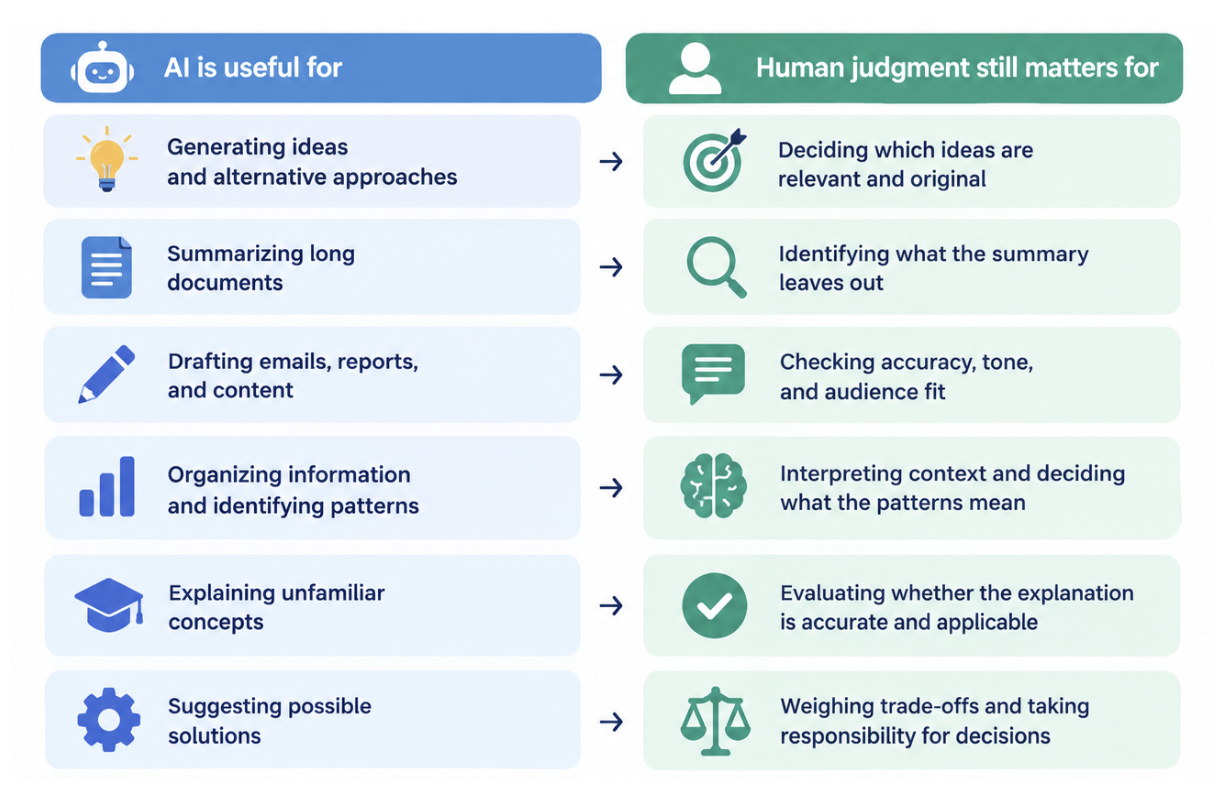
For example, a marketer can ask AI to generate 20 campaign concepts. But choosing the right concept still requires understanding the audience, brand positioning, budget, and campaign objectives.
An analyst can use AI to help explain a spreadsheet or draft a summary of findings. But the analyst still needs to check the underlying data, validate the calculations, and determine whether the conclusions are supported by evidence.
A student can ask AI to explain a difficult concept. But they still need to understand it well enough to apply it independently, answer follow-up questions, and recognize when an explanation is incomplete.
The best approach is to let AI help with the process without automatically handing over the judgment.
You don't need an advanced technical background to use AI effectively. Start with everyday tasks where AI can help you work more efficiently while leaving important decisions in your hands.
One of the most useful ways to work with AI is to treat it as a brainstorming partner.
Instead of asking it to produce one final answer, ask it to generate alternatives, challenge your assumptions, or explore perspectives you may have missed.
Example for marketers
Instead of prompting:
"Give me a social media campaign idea for a new product."
Try:
"Generate five social media campaign concepts for a new skincare product targeting young professionals. Give each concept a different creative angle, explain its potential strengths and weaknesses, and suggest one way to make it distinctive. Avoid generic influencer campaigns."
Then evaluate the ideas yourself.
Does the concept fit the brand?
Is it relevant to the target audience?
Is it realistic for the available budget?
Does it offer something different from competitors?
What assumptions need to be tested?
You can also ask AI to critique your own ideas rather than generate everything from scratch.
For example: "Here is my campaign concept. Identify three weaknesses, challenge my assumptions, and suggest improvements without replacing the core idea."
This approach keeps you actively involved in the creative process. AI expands the options, but you decide which direction deserves further development.

Long reports, research papers, meeting notes, and industry articles can take hours to review. AI can help you identify key themes and create a starting point for further reading.
For example, you could ask:
"Summarize this report into five key findings. For each finding, include the supporting evidence, relevant figures, and any limitations or unanswered questions mentioned in the source."
This is particularly useful for analysts, researchers, and professionals who regularly work with large amounts of information.
However, summaries can omit important qualifications or make uncertain findings sound more definitive than they are.
Before using an AI-generated summary in your work:
Check important claims against the original document.
Verify figures, dates, names, and quotations.
Read the surrounding paragraphs for context.
Look for limitations, exceptions, and conflicting evidence.
Make sure the summary distinguishes facts from interpretations.
For example, a report might say that a campaign was associated with an increase in sales. That doesn't automatically prove the campaign caused the increase. Other factors may have contributed.
AI can help you get through information faster, but faster reading doesn't replace careful interpretation.
AI can help you overcome the blank-page problem when writing emails, reports, presentations, proposals, or social media content.
You can use it to organize your thoughts, suggest an outline, adjust tone, or create an initial draft.
Example for a knowledge worker
"Draft a concise project update for my manager. Organize it into completed tasks, current progress, blockers, and next steps. Use a professional but natural tone. Leave placeholders for information that has not been provided."
Once you have a draft, review it before sending.
Is every statement accurate?
Does the message reflect what actually happened?
Are the priorities and next steps clear?
Does the tone fit the recipient and situation?
Does it sound like something you would genuinely say?
The same principle applies to marketing content. AI might produce grammatically correct copy that sounds generic, misses the brand's personality, or makes claims the company cannot substantiate.
Use AI to improve clarity and structure, not to replace your understanding of the message.
A useful habit is to write down your main argument or key points before asking AI to draft. That way, you begin with your own thinking and use AI to help communicate it more effectively.

Research often involves collecting information from multiple sources, comparing viewpoints, and identifying recurring themes. AI can help organize this information into categories, summaries, comparison tables, or questions for further investigation.
For example, a market researcher might ask:
"Organize these interview notes into recurring themes. For each theme, identify the supporting observations, any contradictory evidence, and questions that require further investigation. Do not invent findings that aren't present in the notes."
An analyst might use a similar approach to structure customer feedback, compare product features, or organize competitor research.
The important distinction is between organizing evidence and deciding what the evidence proves.
If AI identifies a recurring customer complaint, you should still check how many customers mentioned it, whether the sample is representative, and whether other feedback contradicts the pattern.
If AI compares competitors, you should verify the information against current, reliable sources rather than assume every feature or price is correct.
.
AI can be a useful learning companion, especially when you're entering a new role, changing careers, or trying to understand an unfamiliar subject.
Instead of asking AI to complete an assignment or produce an answer you don't understand, use it to help you build the knowledge needed to solve similar problems independently.
For example:
For students: Ask AI to explain a difficult concept using a practical example, then quiz you on it.
For marketers: Ask it to explain conversion rate optimization and create a hypothetical case study for practice.
For analysts: Ask it to explain a spreadsheet formula, walk through the logic, and give you a similar problem to solve.
For new employees: Ask it to help you prepare questions before a meeting or explain unfamiliar workplace terminology.
For career changers: Ask it to identify foundational skills for a target role and suggest practice projects to build those skills.
Try this prompt:
"Teach me the basics of [topic] as if I'm a beginner. Explain the key concepts, give me a practical example, then ask me three questions to test my understanding. Don't reveal the answers until I try."
The real test is whether you can explain or apply what you've learned without relying entirely on AI.
If you can only reproduce an answer generated by a tool, you may have completed the task without fully developing the underlying skill.
AI-generated content can sound confident even when it contains errors, outdated information, misleading interpretations, or references that don't support the claims being made.
That's why fact-checking should be part of your workflow, not an optional final step.
Here are five practical ways to check AI output before using it.
When AI provides facts, statistics, or research findings, look for the original source.
Prioritize primary sources where possible, such as official reports, government data, original research papers, company documentation, or published datasets.
For example, if AI says that a particular skill is among the fastest-growing skills in the workplace, find the report that supports the claim and confirm the wording, date, and context.
Don't cite a source simply because AI has provided a link. Open it and make sure it actually supports the statement.
Specific details can make an answer look credible, but they are also easy to get wrong.
Before using AI-generated information in a presentation, report, or article, check:
Statistics and percentages
Publication dates
Names and job titles
Product features and prices
Formulas and calculations
Quotations and source references
For calculations, use a spreadsheet, calculator, or the relevant analytical tool to verify the result when accuracy matters.
Sometimes the problem isn't a completely incorrect answer. It's an answer based on assumptions that don't fit your situation.
Ask follow-up questions such as:
"Which parts of this answer are confirmed facts, and which are assumptions?"
"What information is missing before we can make this recommendation?"
"What evidence would challenge this conclusion?"
"What alternative explanations should I consider?"
These questions can help expose gaps, although AI's own assessment of uncertainty should not be treated as proof that its answer is correct.

AI may produce an answer that is reasonable but incomplete.
Before accepting a recommendation, consider who or what might be missing from the analysis.
For example, a proposed marketing strategy may focus on engagement while ignoring conversion costs. A business recommendation may emphasize short-term savings without considering implementation risks. A research summary may highlight the majority opinion while overlooking a small but important group.
Ask yourself whether the answer addresses the actual problem, considers relevant alternatives, and accounts for important trade-offs.
Ultimately, you are responsible for the work you submit, publish, or use to make decisions.
That means checking the accuracy of important claims, protecting confidential information, respecting copyright and applicable policies, and being transparent about AI use when required.
The higher the stakes, the more rigorous your verification should be. A brainstorming suggestion needs less scrutiny than a financial recommendation, legal interpretation, safety-related decision, or report that informs business strategy.
AI can support your judgment, but it cannot automatically take responsibility for the consequences of your decisions.

Using AI isn't the problem. Using it without thinking about how it affects your work is where things can go wrong.
The first response may be useful, but it may also be generic, incomplete, or based on an incorrect assumption.
Try this instead: Ask for alternative explanations, request supporting evidence, and compare the response against your own reasoning before deciding what to use.
If you ask AI to solve every problem from the beginning, you may miss opportunities to practice the skills you need to develop.
Try this instead: Attempt the task yourself first, even briefly. Write down your initial ideas, calculations, or reasoning. Then use AI to identify gaps, challenge your assumptions, or improve your approach.
You don't have to do everything manually. The goal is to stay involved in the parts of the task that build your expertise.
Clear writing, structured bullet points, and confident explanations can make an answer seem more reliable than it is.
Try this instead: Separate presentation quality from factual accuracy. Check the evidence, logic, and assumptions rather than judging an answer by how professional it sounds.
Pasting internal documents, client details, financial data, or confidential project information into an unapproved AI tool can create privacy, security, and compliance risks.
Try this instead: Follow your organization's AI and data-handling policies. Use approved tools, remove identifying details when appropriate, and never assume information is safe to share simply because a tool is convenient.
AI-generated work can become generic when it lacks real context, original insight, or a clear understanding of the audience.
Try this instead: Add your expertise, relevant examples, evidence, and judgment. Make sure the final result reflects the actual task and the needs of the people who will use it.
You don't need a complicated system to use AI more thoughtfully. Start with four steps that you can apply to everyday tasks.
Before opening an AI tool, clarify what you're trying to accomplish.
Ask yourself:
What is the actual problem I'm solving?
What information or context does AI need?
What would a useful result look like?
Which parts require my own judgment or expertise?
A specific prompt with relevant context will usually be more useful than a vague request.
For example, instead of asking "Analyze this campaign," explain the campaign objective, target audience, available metrics, and the questions you want to investigate. Only provide information you're permitted to share.
Review the output before treating it as reliable.
Check facts, calculations, source quality, assumptions, and whether the response answers your actual question. For important decisions, seek additional evidence or expert review where appropriate.
Don't assume that asking AI to verify itself is sufficient. Use independent sources or tools when accuracy matters.
Use your expertise to correct, challenge, and improve the response.
You might remove irrelevant suggestions, add missing context, rewrite generic wording, test alternative approaches, or change the recommendation based on real-world constraints.
This is where your knowledge of the business, audience, customer, or task becomes especially valuable.
Before submitting or using the output, make sure it meets the required standard.
Ask yourself:
Is the information accurate and relevant?
Can I explain the reasoning behind the result?
Have I protected sensitive information?
Does the final output meet the organization's requirements?
Am I comfortable taking responsibility for how this work is used?
If you cannot confidently explain or defend a critical part of the result, you may need to investigate further.
The goal isn't to prove that you can work without AI. It's to become someone who knows how to use AI responsibly and effectively.
AI is changing how organizations approach knowledge work, productivity, and collaboration.
Microsoft's 2025 Work Trend Index describes the emergence of “Frontier Firms,” organizations that combine AI capabilities with human direction and collaboration. The report points toward a workplace where people increasingly need to know how to work alongside AI rather than simply treat it as another standalone tool.
For individuals, this creates an important opportunity: developing AI fluency while strengthening the human skills that make AI-assisted work valuable.
These include:
Critical thinking: Evaluating evidence and questioning assumptions.
Communication: Explaining ideas clearly and adapting messages to different audiences.
Problem-solving: Identifying the real problem before jumping to a solution.
Creativity: Combining ideas and developing approaches that fit the context.
Adaptability: Learning new tools and adjusting when circumstances change.
Accountability: Understanding the consequences of decisions and taking ownership of outcomes.
You don't need to master every AI tool to get started. Focus on learning how to use relevant tools for your work, checking the quality of their output, and building the skills that help you make better decisions.
Learning to use AI effectively is one part of preparing for the future of work. The next step is turning what you learn into practical skills that support your career growth.
With Jobcadu, you can explore career development resources, discover courses to build relevant skills, and use the Resume Builder to communicate your experience and capabilities more clearly.
Whether you're preparing for your first full-time job, developing new skills for your current role, or exploring a career change, make continuous learning part of your career strategy.
Don't just learn to use new tools. Build the skills to make them work for you.
Explore Jobcadu's career resources, find your next learning opportunity, and start building your career with confidence.
No sections detected in this article.


